Why 4D Simulation Beats Gantt Charts for Communicating Your Programme


In the construction world, timelines are everything. For decades, we’ve relied on Gantt charts to communicate programmes—but let’s be honest, they’re not always the easiest to understand, especially for teams on site or stakeholders outside of project controls.
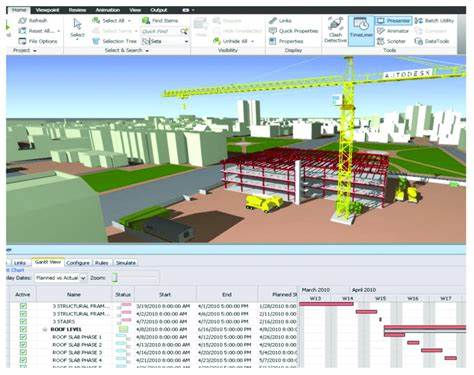
Enter 4D simulation. It combines your construction schedule (the 4th dimension: time) with your 3D BIM model to visually show how the project will be built over time.
Not only is it more engaging—it’s also more effective. Here’s why 4D is changing the game and why it might be time to move beyond Gantt charts for good.
🚀 Save Time and Money
Time is money on any project. 4D simulations help you avoid delays and costly mistakes by making your programme crystal clear.
Spot inefficiencies before they hit site.
Reduce miscommunication during coordination meetings.
Prevent rework by highlighting issues early.
Simply put, 4D helps you plan smarter, faster, and with fewer surprises.
🔍 Instantly Spot Out-of-Sequence Work
Ever had a subcontractor show up before they should? Or a critical area accessed out of turn?
With 4D, you can see how each trade fits into the schedule. If something happens out of order, it’s immediately obvious in the simulation—long before it becomes a problem on site
🤝 Everyone Understands the Plan
Not everyone can read a Gantt chart—but everyone understands a video. That’s the power of 4D.
Clients get a clear picture of how their building will rise.
Site teams can visualise what they need to do—and when.
Consultants can align design deliverables with construction sequences.
It creates alignment across all teams, reducing confusion and boosting collaboration.
🛠 Scope Can’t Be Missed
One of the most common risks in scheduling? Missed scope.
In a Gantt chart, it’s just a missing line. But in 4D, if something’s not scheduled—it doesn’t move. That visual feedback makes it easy to catch gaps in your programme before they lead to delays.
🔄 Easily Run “What If” Scenarios
Construction is full of unknowns. What if there's a delay in material delivery? What if you need to resequence for weather?
4D lets you simulate different scenarios with ease. Compare options side-by-side. Understand the impact. Make informed decisions fast.
🏗 Visualise Site Logistics
Your programme isn’t just about building elements. It’s also about how you move, store, and access things on site.
4D lets you:
Animate delivery routes and access points.
Show crane positions, temporary works, and storage areas.
Keep safety and logistics front-of-mind during planning.
This is especially powerful for inductions, toolbox talks, and logistics planning.
Final Thoughts
Gantt charts are great—for planners. But 4D simulations make your programme real for everyone else.
They help you:
Communicate better.
Spot issues sooner.
Build more efficiently.
If you want to save time, reduce risk, and get your whole team on the same page, it’s time to think in 4D.
Want to bring 4D to your next project?


Comments